Features
Roadmap Overview: Best Times to Post on Reddit
The Roadmap module helps you find the highest-engagement time slots for your target subreddits and build a 30-day growth plan — all in one place.
Work through the sections below to complete setup and checks, then use the top search to jump into related help docs when needed.
What Is Roadmap?
Roadmap is GoGlobal's growth-planning hub. It combines two views — Map and Plan — to help you understand when your target communities are most active and translate that data into a concrete, day-by-day posting schedule. The module is currently in Beta and is being actively improved based on user feedback.
Map View: Subreddit Activity by Hour
The Map view opens with a stacked bar chart titled 'Subreddit activity by hour'. Each bar represents one hour of the day (00:00–23:00 UTC). The height of each bar reflects estimated activity from recent Reddit post timestamps across all your tracked subreddits, with fallback baselines used when live subreddit data is unavailable. Each subreddit is shown as a distinct color segment within the bar, so you can quickly see which community drives activity at each time.
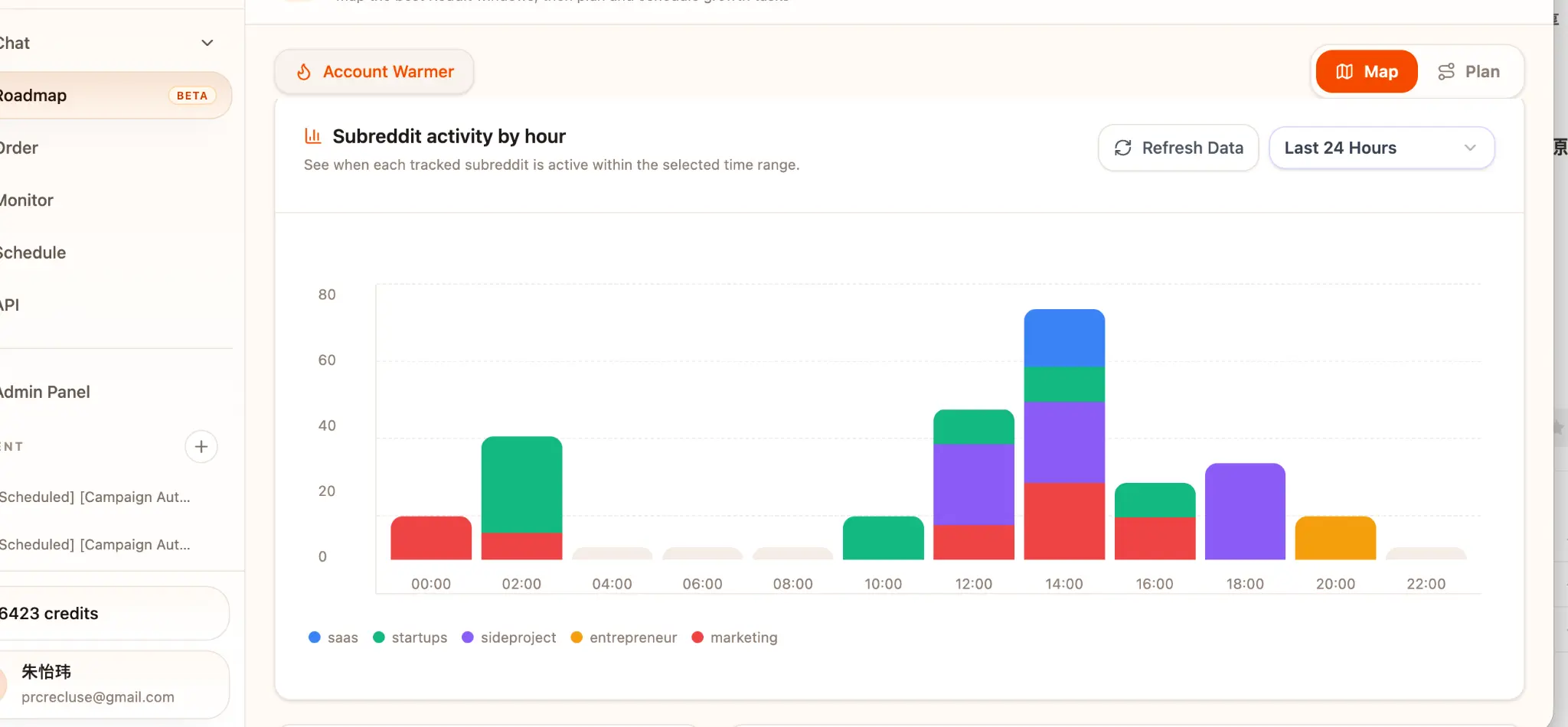
- 1Select the time range using the dropdown in the top-right corner (Last 24 Hours, Last 7 Days, or Last 30 Days).
- 2Click 'Refresh Data' to pull the latest activity snapshot for your tracked subreddits.
- 3Hover over any bar segment to see the exact post count for that subreddit at that hour.
- 4The three highest-scoring time slots are displayed as ranked cards above the chart (#1 SLOT, #2 SLOT, #3 SLOT), each showing the day, time, and an Engagement Fit Score out of 100.
The Engagement Fit Score is calculated from post volume, comment velocity, and upvote rate during that window. A score above 90 indicates a window where posts in your niche consistently receive early traction.
Plan View: Your 30-Day Growth Roadmap
Switching to the Plan tab shows a structured 30-day warm-up and growth plan tailored to your account's current karma level and target subreddits. The plan is divided into three phases: Days 1–7 (Account warm-up), Days 8–21 (Community building), and Days 22–30 (Promotion ready). Each phase shows a progress bar and a brief description of the recommended activity mix.

Today's Review Checklist
At the bottom of the Plan view, the 'Today's Review Checklist' panel shows the four actions you should complete today to stay on track. Completed items are marked with a green checkmark. Items not yet done show an arrow indicator. The checklist refreshes daily.

- 1Review the latest saved warm-up plan.
- 2Pick today's manual comments and communities from the suggested list.
- 3Avoid promotion until the plan confirms the account is ready.
- 4Generate a fresh plan if your goals or target communities have changed.
Saved Account Warmer Plans
Every plan you generate is saved automatically and listed in the 'Saved Account Warmer Plans' panel on the right side of the Plan view. Each entry shows the plan name, creation date, and an auto-incremented plan number (e.g., #582). Click any saved plan to restore it as the active plan.
Generate a new plan whenever you add a new subreddit to your campaign or change your product positioning. Old plans remain accessible for reference.