Features
Reddit Monitor: Track Keywords and Find Reddit Opportunities
Use Reddit Monitor to track keywords across Reddit in real time, discover high-traffic posts, and find the best opportunities to engage with your target audience.
Work through the sections below to complete setup and checks, then use the top search to jump into related help docs when needed.
What Is Reddit Monitor?
Reddit Monitor is GoGlobal's keyword intelligence tool. It continuously scans Reddit for posts and comments that match your tracked keywords, scores each result by relevance and engagement potential, and surfaces the best opportunities for you to comment, reply, or post. It is the fastest way to find conversations where your product or expertise is directly relevant.
Adding Keywords to Track
Navigate to Monitor in the left sidebar. The search bar at the top reads 'Search keyword (leave blank to use: your product name)'. You can track up to 10 keywords simultaneously.
Adding Keywords to Track
Complete the setup step by step
Type a keyword in the search bar and click the orange 'Search' button, or press Enter.
Leave the search bar blank and click Search to automatically use your product name as the keyword.
The keyword is added as a card in the keyword grid at the top of the page.
Each keyword card shows: Valid posts count, Suggested replies count, the date it was added, and a Tracked toggle.
- 1Type a keyword in the search bar and click the orange 'Search' button, or press Enter.
- 2Leave the search bar blank and click Search to automatically use your product name as the keyword.
- 3The keyword is added as a card in the keyword grid at the top of the page.
- 4Each keyword card shows: Valid posts count, Suggested replies count, the date it was added, and a Tracked toggle.
- 5Enable the 'Tracked' toggle on a keyword card to receive ongoing monitoring for that keyword.
Track your product name, your main competitor's name, and 2–3 pain-point phrases your target customers use. This combination captures both brand mentions and unbranded intent.
Understanding Keyword Cards
Each keyword card in the grid displays four key metrics that help you prioritize which keywords to act on first.
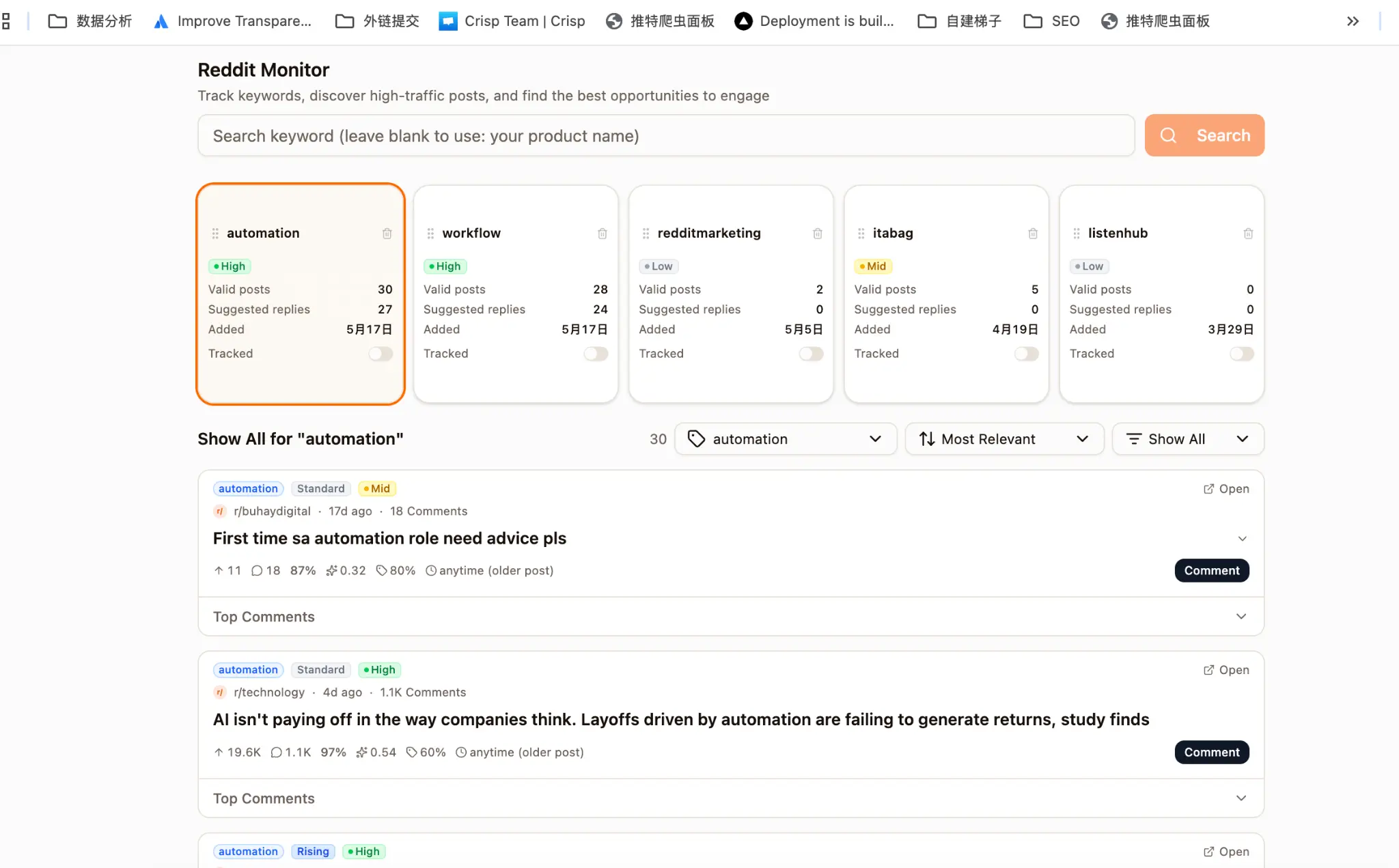
- 1Valid posts — the number of Reddit posts that match the keyword and meet GoGlobal's quality threshold (minimum upvotes and comment activity).
- 2Suggested replies — the number of posts where GoGlobal has pre-generated a comment reply for you to review and send.
- 3Added — the date the keyword was first added to your monitor.
- 4Tracked — a toggle that enables continuous background monitoring. When enabled, GoGlobal checks for new matching posts every few hours.
Reading Post Results
Below the keyword cards, the 'Show All for [keyword]' section lists every matching post. Each post entry shows the subreddit, post age, comment count, and three scoring metrics.
Reading Post Results
Complete the setup step by step
Relevance score (%) — how closely the post matches your keyword and product context.
Engagement score (decimal) — a composite of upvote velocity and comment rate, normalized to the subreddit's baseline.
Sentiment score (%) — the estimated positive/neutral/negative sentiment of the post and its top comments.
Timing label — 'anytime (older post)' means the post is still receiving comments and is safe to engage with. 'Rising' means the post is gaining traction in the last 2 hours.
- 1Relevance score (%) — how closely the post matches your keyword and product context.
- 2Engagement score (decimal) — a composite of upvote velocity and comment rate, normalized to the subreddit's baseline.
- 3Sentiment score (%) — the estimated positive/neutral/negative sentiment of the post and its top comments.
- 4Timing label — 'anytime (older post)' means the post is still receiving comments and is safe to engage with. 'Rising' means the post is gaining traction in the last 2 hours.
Prioritize posts labeled 'Rising' with a relevance score above 80%. These are the highest-leverage opportunities — your comment will be seen by the most people while the post is still on the front page.
Using Suggested Replies
Click the 'Comment' button on any post to open the suggested reply panel. GoGlobal has pre-drafted a comment tailored to the post's context and your product positioning. You can edit the draft before sending. Click 'Post via my account' to publish using your connected Reddit account, or 'Post via our accounts' to use a GoGlobal-managed high-karma account.
Always read the full post and top comments before sending a reply. Personalizing the AI draft with a specific reference to the original post dramatically increases the chance of a positive response.
Filtering Posts by Keyword
When you have multiple keywords tracked, the post list shows results for all of them by default. Use the keyword filter dropdown (first dropdown in the toolbar, showing the active keyword name) to narrow the list to a single keyword.

- 1Click the first dropdown in the toolbar (it shows the current keyword name, e.g. 'automation').
- 2Select 'All Keywords' to view posts from every tracked keyword in one combined list.
- 3Select a specific keyword (e.g. 'workflow') to filter the list to only that keyword's matching posts.
- 4The post count shown next to the dropdown label updates to reflect the filtered result count.
Use keyword filtering when you want to batch-reply to all posts for a single keyword in one session. It keeps your workflow focused and prevents you from accidentally mixing up reply contexts.
Sorting Posts
The second dropdown in the toolbar controls how the post list is sorted. The default is 'Most Relevant', which ranks posts by GoGlobal's combined relevance and engagement score.
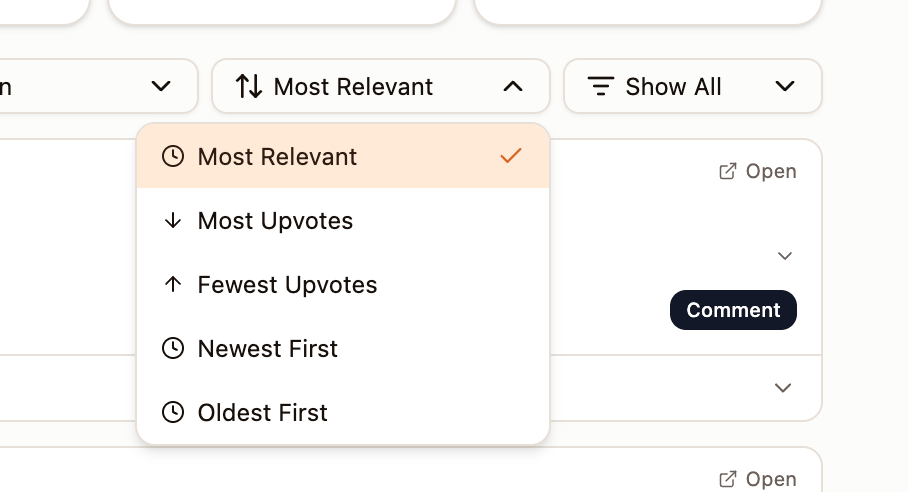
- 1Most Relevant (default) — ranks posts by GoGlobal's combined relevance + engagement score. Best for finding the highest-value opportunities first.
- 2Most Upvotes — shows posts with the highest upvote count first. Use this to find already-viral threads where a top comment gets maximum visibility.
- 3Fewest Upvotes — shows newer or niche posts first. Use this to find early-stage threads where you can be one of the first commenters.
- 4Newest First — sorts by post creation time, most recent at the top. Best for time-sensitive keywords where recency matters.
- 5Oldest First — sorts by post creation time, oldest at the top. Useful for reviewing historical posts you may have missed.
Show All vs. Suggested Posts to Reply
The third dropdown in the toolbar ('Show All') controls whether the list shows all valid posts or only the time-sensitive ones that GoGlobal recommends you reply to immediately.

- 1Suggested posts to reply — shows only posts in the 'golden window' (high engagement in the last 2–6 hours), 'rising' posts (gaining traction now), or 'piggyback' posts (a top comment is already getting replies). Count shown: 27.
- 2Show all valid posts — shows every post that meets GoGlobal's quality threshold, including older posts that are still receiving comments. Count shown: 30.
Start your daily Monitor session with 'Suggested posts to reply' to handle the most time-sensitive opportunities first. Switch to 'Show all valid posts' once you have replied to all suggested posts, to catch any older threads you may want to engage with.