Features
Campaign Overview: AI-Powered Reddit Promotion from Draft to Publish
Learn how to create a Campaign, review AI-generated content drafts, track publishing history, monitor progress statistics, and configure Manual or Auto execution mode with automatic upvotes and comments.
Work through the sections below to complete setup and checks, then use the top search to jump into related help docs when needed.
Campaign Overview: Three Tabs at a Glance
Every Campaign detail page has three tabs — Content, History, and Static — each serving a distinct purpose. The header always shows the campaign name, the target domain, the current status badge (Draft / Active / Paused), an Edit button, and an Activate button.
Content Tab: Review and Manage Generated Drafts
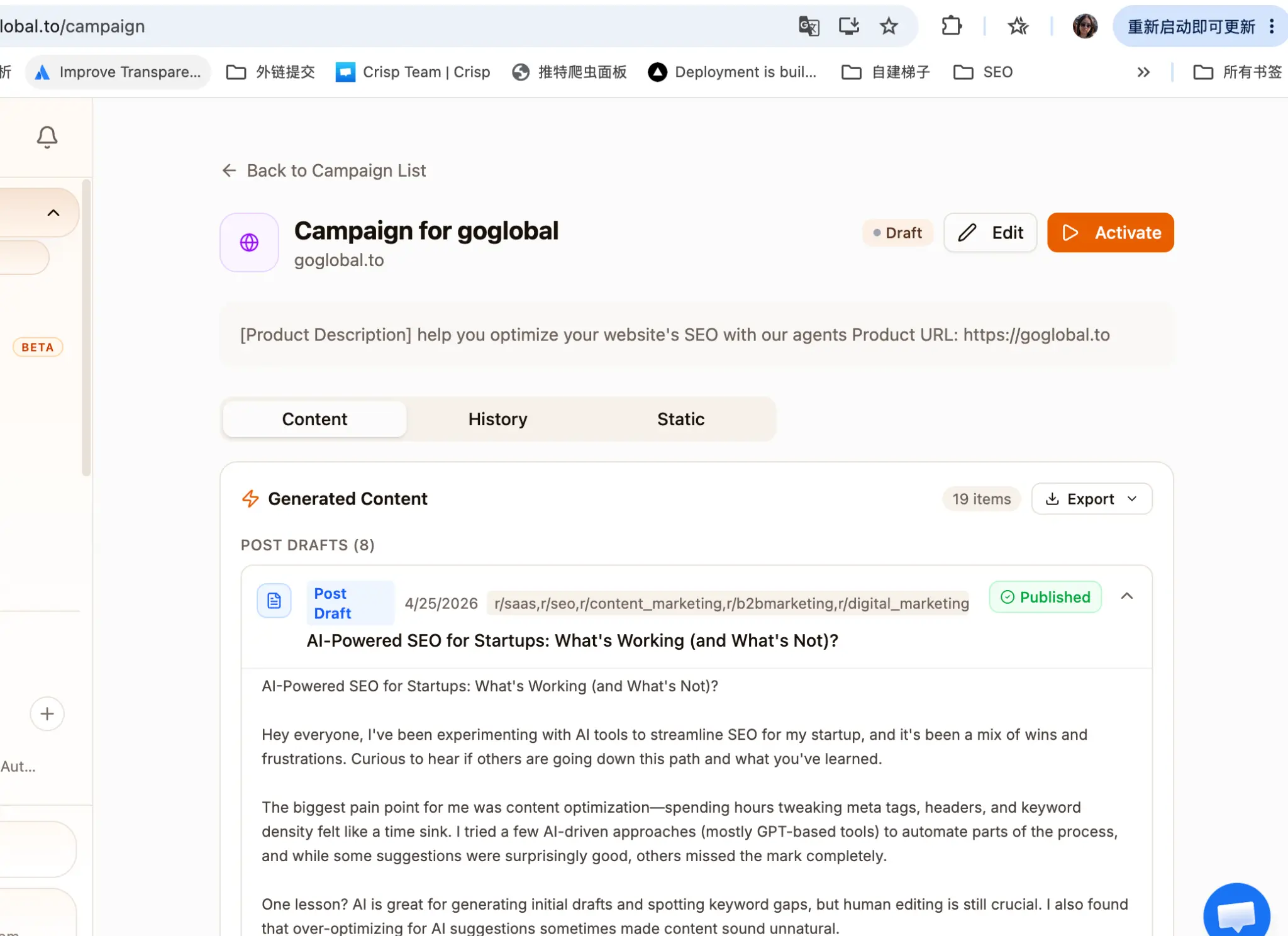
The Content tab is where you review everything the AI has prepared for your campaign. At the top you see the total item count (e.g., 19 items) and an Export button. Drafts are grouped into POST DRAFTS and COMMENT DRAFTS sections. Each card shows the scheduled subreddits, the post title, the full body text, and a status badge. Expand any card to read the complete draft before deciding to publish or discard it.
Content Tab: Review and Manage Generated Drafts
Complete the setup step by step
Click the expand arrow on any draft card to read the full post or comment body.
Check the subreddit tags at the top of each card to confirm the AI has selected appropriate communities.
Use the status badge (Published / Pending / Draft) to track which items have already gone live.
Click Export to download all drafts as a CSV file for offline review or team sharing.
- 1Click the expand arrow on any draft card to read the full post or comment body.
- 2Check the subreddit tags at the top of each card to confirm the AI has selected appropriate communities.
- 3Use the status badge (Published / Pending / Draft) to track which items have already gone live.
- 4Click Export to download all drafts as a CSV file for offline review or team sharing.
In Manual Mode, no draft is published until you explicitly approve it. In Auto Mode, drafts are published automatically on the AI-recommended schedule — review them early.
History Tab: Publishing History by Thread
The History tab shows every post and comment that has been published or attempted, grouped by Reddit thread. The header card displays the total count of posts and comments (e.g., 3 posts, 0 comments). Each thread group shows the subreddit, the post title, and a timeline of events with timestamps and status badges.
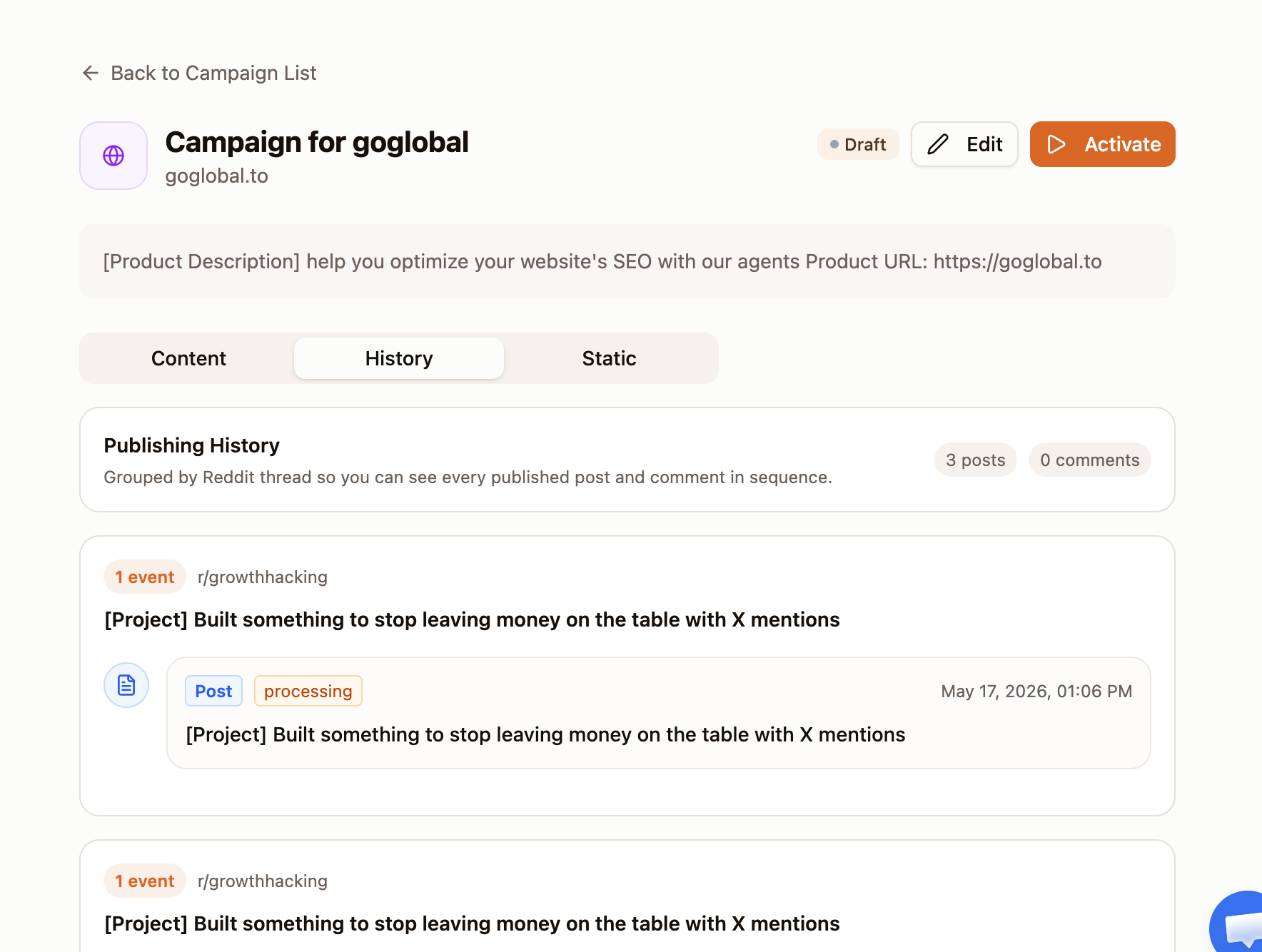
A 'processing' status means the post has been submitted to the queue and is awaiting execution by a high-karma account. It typically resolves within a few minutes.
Static Tab: Campaign Progress and Strategy Summary
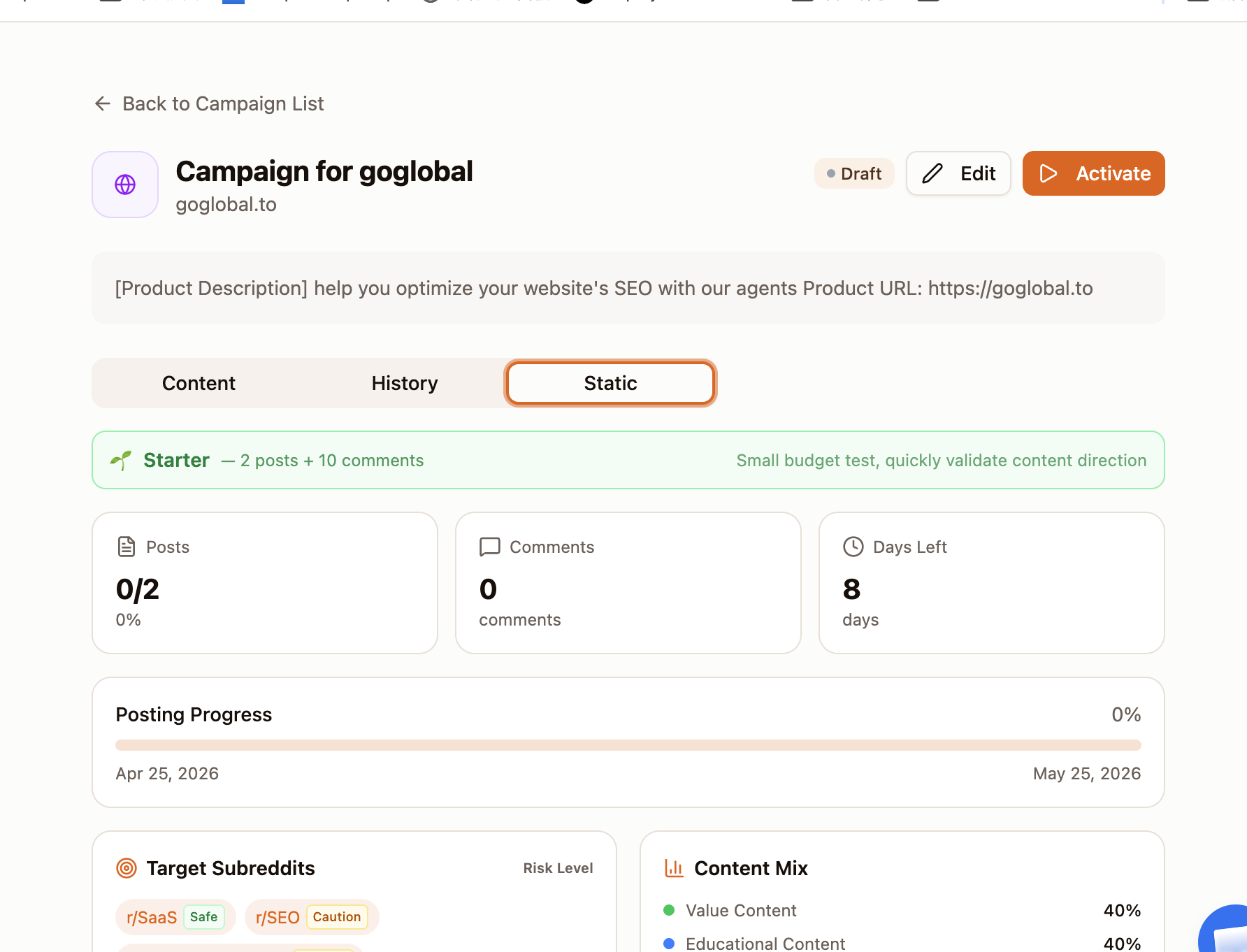
The Static tab gives you a bird's-eye view of your campaign execution progress and content strategy. It is read-only and updates automatically as posts are published.
Creating a Campaign: Step 1 — Basic Info
Click the + button in the sidebar or the 'New Campaign' button on the Campaign List page to open the three-step creation wizard. Step 1 collects the launch type and campaign name. Your input is saved automatically on this device, so you can safely close the modal and resume later.

- 1Select Launch Type: 'First Launch' for a new product debut, or 'Ongoing Campaign' for sustained brand promotion.
- 2Enter a Campaign Name that clearly identifies the product or goal (e.g., 'Campaign for goglobal').
- 3Click Next to proceed to Step 2.
Creating a Campaign: Step 2 — Product Details
Step 2 collects your product information. The more detail you provide, the better the AI can select subreddits and generate authentic content. You do not need to manually choose communities — the AI handles that based on your inputs.

- 1Enter your Product Name (required). Use the actual product name, not a generic description.
- 2Paste your Product URL or a YouTube demo video link. The AI will crawl the page to extract positioning and features.
- 3Optionally drag and drop a PDF one-pager or product demo video into the upload area for richer context.
- 4Click Next to proceed to Step 3.
The blue info box reminds you: 'Provide as much product information as possible. AI will automatically analyze and recommend the best subreddits and content strategies — no manual selection needed.'
Creating a Campaign: Step 3 — Execution Mode and Post-Publish Engagement
Step 3 is where you choose how the campaign runs and whether to enable automatic engagement boosters. This step also shows how your budget maps to the planned number of posts. Campaign creation itself does not deduct a flat setup fee; credits are charged when AI actually generates content.

Manual Mode vs. Auto Mode
The Execution Mode setting determines who controls the publishing trigger. Both modes use the same AI-generated drafts — the difference is whether you or the system decides when each draft goes live.
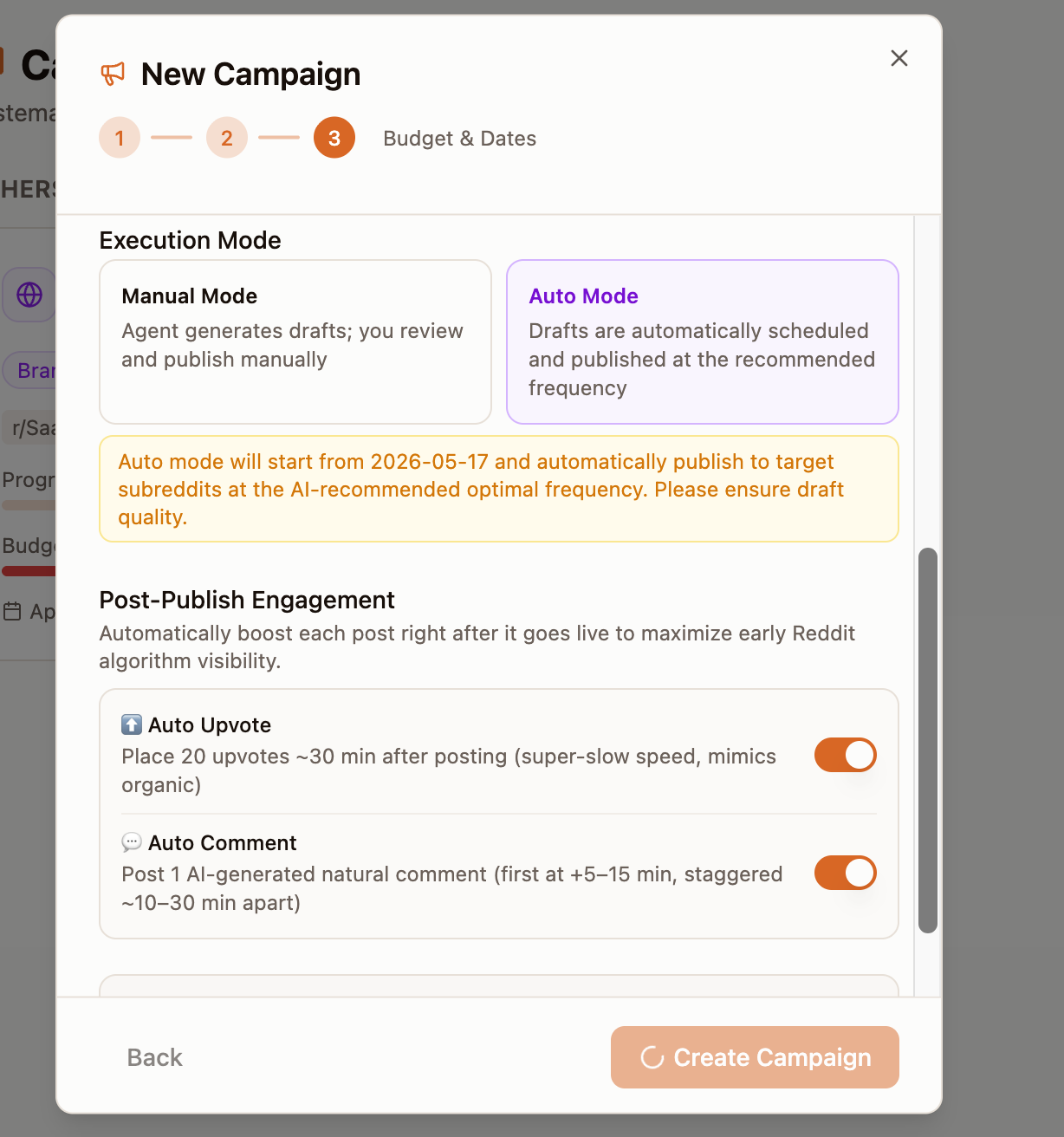
- 1Manual Mode: The agent generates all drafts and places them in the Content tab. You review each one and publish manually at your chosen time. Nothing is posted without your explicit action.
- 2Auto Mode: Drafts are automatically scheduled and published at the AI-recommended optimal frequency. The system picks the best posting windows based on subreddit activity patterns. You can still edit or delete drafts before they are published.
- 3Recommendation: Start with Manual Mode to review the AI content quality and subreddit selection before trusting Auto Mode with full autonomy.
You can switch between Manual and Auto Mode after campaign creation by clicking the Edit button on the campaign detail page.
Post-Publish Engagement: Auto Upvote and Auto Comment
The Post-Publish Engagement section in Step 3 lets you automatically boost each post immediately after it goes live. This maximizes early Reddit algorithm visibility by simulating organic engagement in the critical first hour.
Post-Publish Engagement: Auto Upvote and Auto Comment
Complete the setup step by step
Auto Upvote (toggle): Places 20 upvotes approximately 30 minutes after posting, at super-slow speed to mimic organic voting behavior. Recommended: ON.
Auto Comment (toggle): Posts 1 AI-generated natural comment, with the first comment arriving at +5–15 minutes after posting, and subsequent comments staggered ~10–30 minutes apart. Recommended: ON.
Both toggles are independent. You can enable Auto Upvote without Auto Comment, or vice versa.
- 1Auto Upvote (toggle): Places 20 upvotes approximately 30 minutes after posting, at super-slow speed to mimic organic voting behavior. Recommended: ON.
- 2Auto Comment (toggle): Posts 1 AI-generated natural comment, with the first comment arriving at +5–15 minutes after posting, and subsequent comments staggered ~10–30 minutes apart. Recommended: ON.
- 3Both toggles are independent. You can enable Auto Upvote without Auto Comment, or vice versa.
Auto Upvote and Auto Comment use the same high-karma account pool as manual orders. The super-slow speed setting is specifically designed to avoid pattern detection by Reddit anti-spam systems.