Features
Order Post: Publish Reddit Posts, Comments, Replies, and Votes
Use GoGlobal's Order module to publish posts, comments, replies, and upvotes via managed high-karma accounts. Every order is guaranteed within 48 hours or your credits are refunded.
Work through the sections below to complete setup and checks, then use the top search to jump into related help docs when needed.
What Is the Order Feature?
The Order feature lets you publish Reddit content using GoGlobal's pool of managed high-karma accounts (800–1500 karma each). This is useful when your own Reddit account is new, has low karma, or is temporarily restricted from posting in a specific subreddit. GoGlobal guarantees that every order is successfully executed within 48 hours or your credits are refunded. The Order module has five tabs: Order Post, Order Comment, Comment Reply, Order Votes, and Order Status.
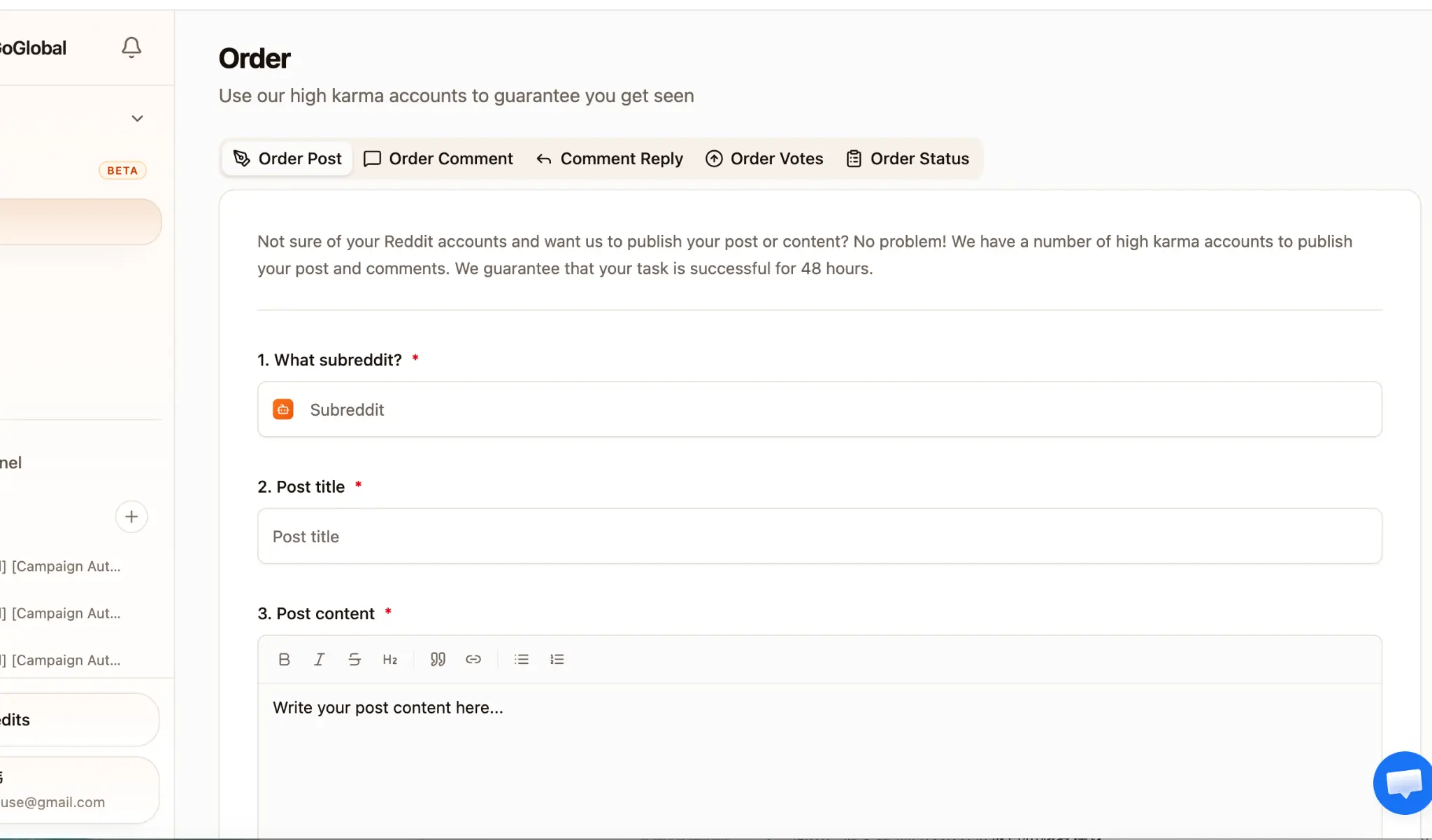
Tab 1: Order Post — Publish a New Reddit Post
Use Order Post when you need to publish a new post to a subreddit using a high-karma managed account. This is ideal for product launches, community introductions, or value-first content that requires an established account to pass subreddit filters.
Tab 1: Order Post — Publish a New Reddit Post
Complete the setup step by step
What subreddit? — enter the subreddit name without the r/ prefix (e.g., 'SaaS', 'startups', 'entrepreneur').
Post title — write a title that follows the subreddit's rules. Avoid clickbait or overly promotional language to reduce the risk of removal.
Post content — use the rich text editor to write the post body. Supports bold, italic, strikethrough, H2 headings, blockquotes, links, and bullet/numbered lists.
Expand the Markdown preview panel to verify that links and formatting render correctly before submitting.
- 1What subreddit? — enter the subreddit name without the r/ prefix (e.g., 'SaaS', 'startups', 'entrepreneur').
- 2Post title — write a title that follows the subreddit's rules. Avoid clickbait or overly promotional language to reduce the risk of removal.
- 3Post content — use the rich text editor to write the post body. Supports bold, italic, strikethrough, H2 headings, blockquotes, links, and bullet/numbered lists.
- 4Expand the Markdown preview panel to verify that links and formatting render correctly before submitting.
- 5Click 'Submit Order'. The post enters the queue and will be published within 48 hours.
Before placing an Order Post, search the target subreddit in Reddit Monitor to check its rules and peak activity windows. Posting during high-activity hours significantly increases organic reach.
Tab 2: Order Comment — Add a Comment to an Existing Post
Order Comment lets you post a comment on any existing Reddit post using a managed high-karma account. This is useful for adding a product mention, answering a question, or contributing to a thread where your own account may be restricted.
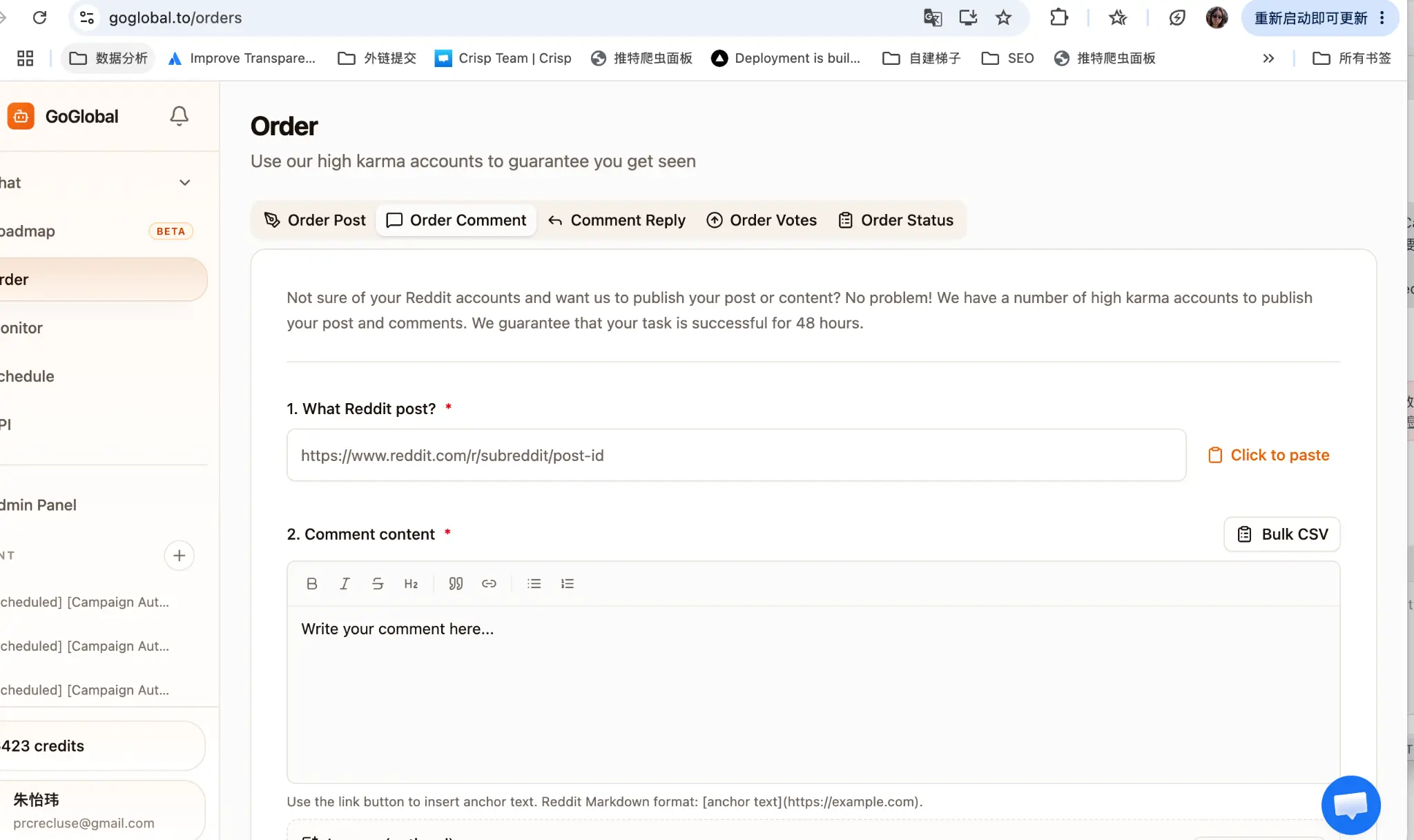
- 1What Reddit post? — paste the full URL of the target post (e.g., https://www.reddit.com/r/subreddit/post-id). Use the 'Click to paste' shortcut to paste from clipboard instantly.
- 2Comment content — write your comment in the rich text editor. Use the link button to insert anchor text in Reddit Markdown format: [anchor text](https://example.com).
- 3To submit multiple comments across different posts, click 'Bulk CSV' and upload a CSV with columns: post_url, comment_content.
- 4Click 'Submit Order'. The comment will be posted within 48 hours.
Order Comment is most effective when the target post is less than 24 hours old and still receiving active engagement. Check the post's activity in Reddit Monitor before ordering.
Tab 3: Comment Reply — Reply to a Specific Comment
Comment Reply lets you reply directly to a specific comment within a thread, not the post itself. This is useful for continuing a conversation, adding a follow-up, or placing a reply in a high-visibility thread position.
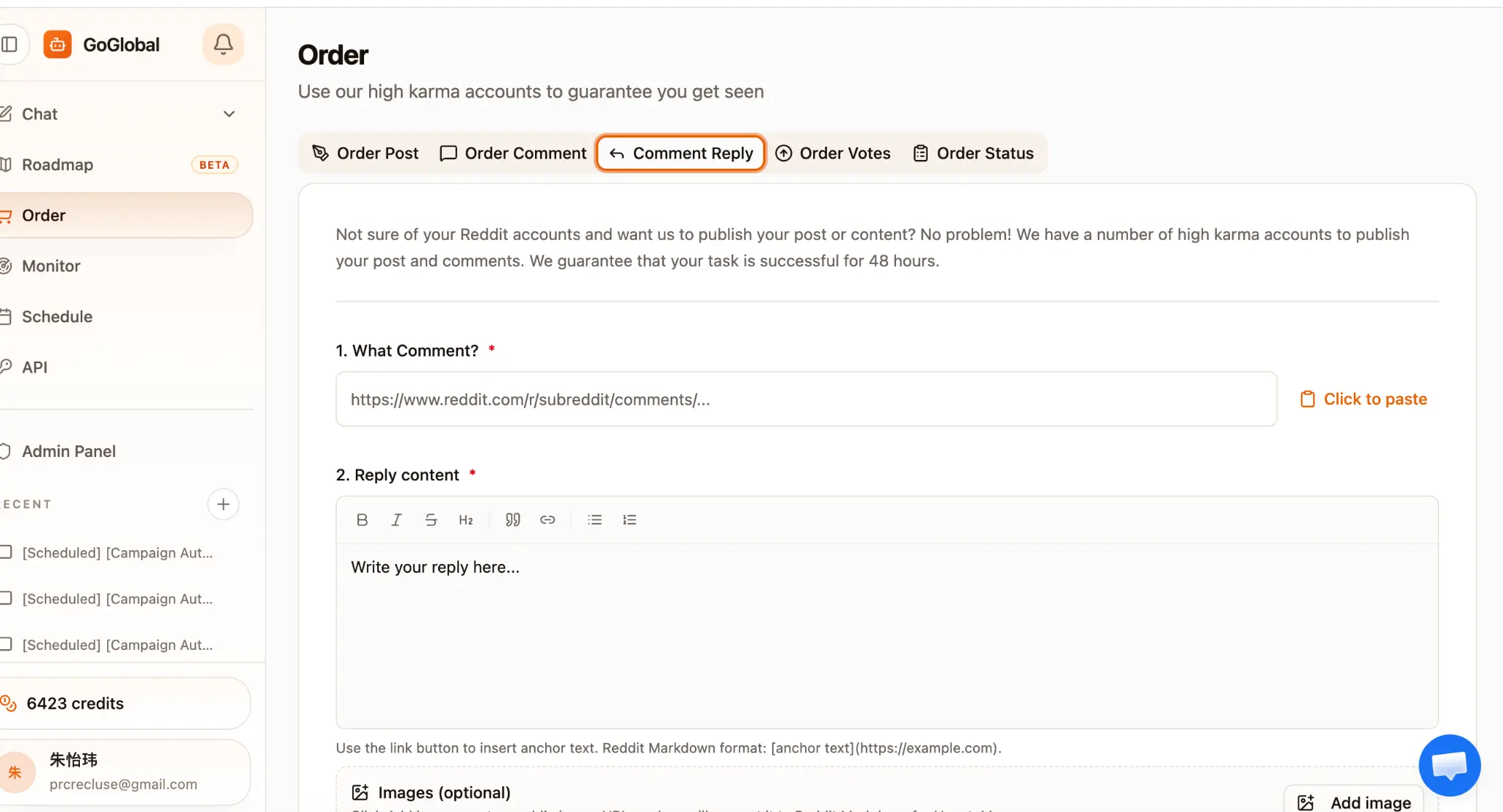
- 1What Comment? — paste the full URL of the specific comment you want to reply to. The URL format is: https://www.reddit.com/r/subreddit/comments/post-id/comment-id.
- 2Reply content — write your reply in the rich text editor. Use the link button to insert anchor text in Reddit Markdown format.
- 3Images (optional) — upload image files, drag and drop them, or add a public image link. GoGlobal appends them to the final post automatically.
- 4Click 'Submit Order'. The reply will be posted within 48 hours.
To get the direct URL of a specific comment, click the timestamp next to the comment author's name on Reddit — this opens the permalink for that comment.
Tab 3 continued: Account Type and Pricing
After writing your comment or reply, you will see the Account Type selector. Choose between High-Karma Account and Normal Account. The credit cost is shown dynamically based on your selection and whether your content contains a link.

- 1High-Karma Account — 60 credits (no link in content) or 100 credits (link included). These accounts have 800–1500 karma and are more trusted by subreddit communities.
- 2Normal Account — 2 credits per comment or reply. Suitable for low-stakes engagement where account credibility is less critical.
- 3The system shows a live credit preview (e.g., 'No link in content — 60 credits') based on whether your content contains a URL.
- 4Boost Engagement tip: after placing a comment order, consider adding 10–20 upvotes via Order Votes to push the comment higher in the thread.
Tab 4: Order Votes — Upvote Posts or Comments
Order Votes lets you add upvotes to any Reddit post or comment to increase its score and visibility in the feed. Votes are distributed gradually over the 48-hour window to appear organic and avoid triggering Reddit's vote manipulation detection.
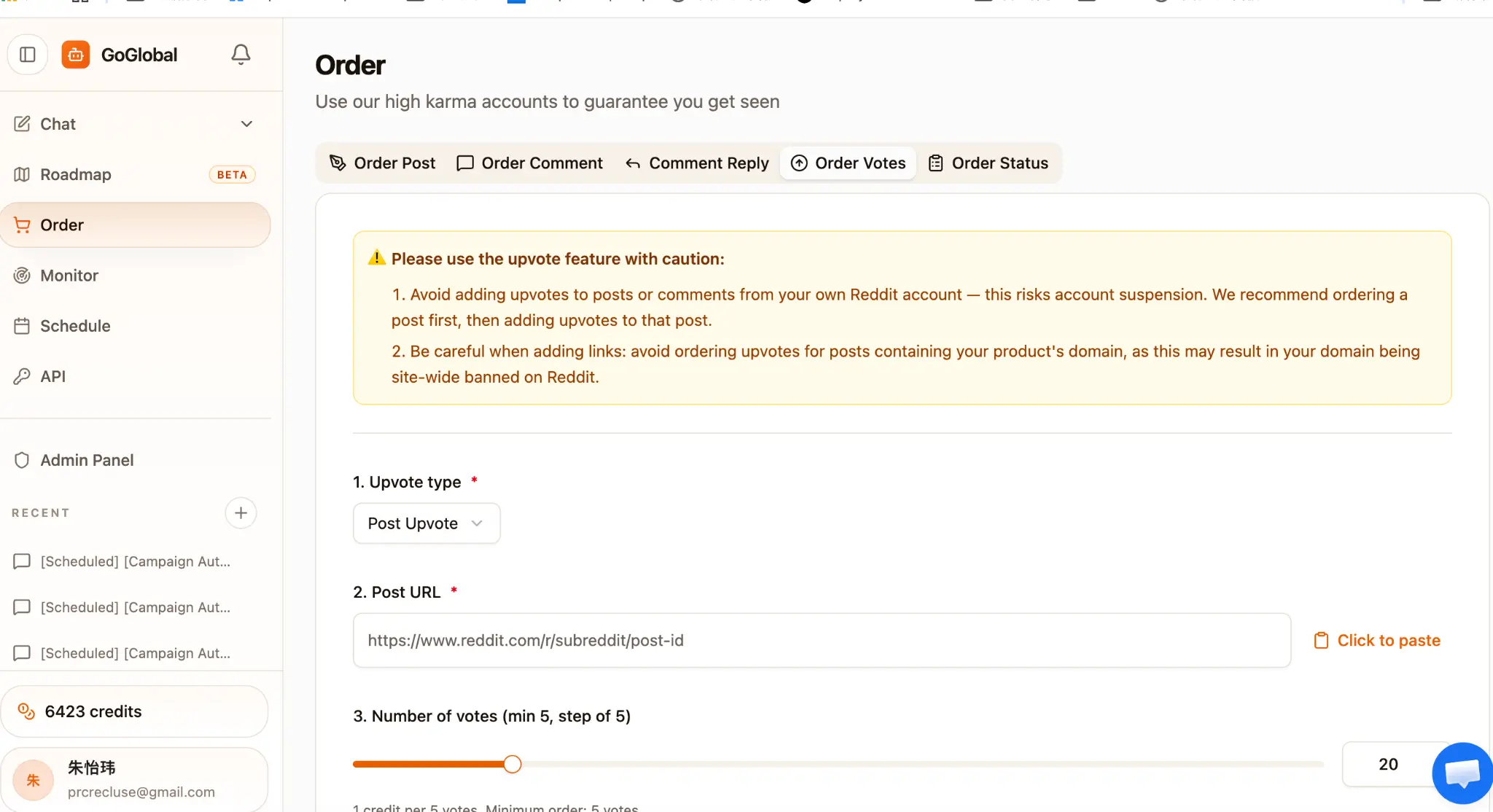
- 1Upvote type — choose 'Post Upvote' to upvote a post, or 'Comment Upvote' to upvote a specific comment.
- 2Post URL / Comment URL — paste the full Reddit URL of the target post or comment.
- 3Number of votes — use the slider to select the quantity. Minimum order: 5 votes. Step size: 5 votes. Cost: 1 credit per 5 votes.
- 4Speed — choose the delivery speed. 'Slow (~50/hr)' distributes votes gradually and looks the most organic. Faster speeds are available but carry higher detection risk.
- 5Click 'Submit Order — X credits' to confirm. The credit cost is shown in real time on the button.
⚠️ Caution: avoid adding upvotes to posts or comments from your own Reddit account — this risks account suspension. We recommend ordering a post first via Order Post, then adding upvotes to that post. Also avoid ordering upvotes for posts containing your product's domain, as this may result in your domain being site-wide banned on Reddit.
Tab 5: Order Status — Track All Your Orders
The Order Status tab shows a full history of all your orders in a sortable table. Each row represents one order with all key details visible at a glance.

- 1Created — the date and time the order was submitted.
- 2Subreddit — the target subreddit for the order.
- 3Type — the order type: Order Post, Order Comment, Comment Reply, or Order Votes.
- 4Cost — the number of credits charged for the order.
- 5Payment — 'Paid' means credits were deducted; 'Pending' means the order is awaiting payment confirmation.
- 6Status — 'Processing' means the order is in the queue; 'Success' means it was published; 'Failed' means it could not be completed and credits were refunded.
- 7View Task — for completed orders, click the external link icon to open the published Reddit post or comment directly.
- 8Actions — click the eye icon to open the Order Details modal; click the refresh icon to retry a failed order.
- 9Export Reporting — click the button at the top right to download a full CSV of all orders for reporting or billing reconciliation.
Click the eye icon on any order row to open the Order Details modal. It shows the Internal ID, External ID, Type, Subreddit, Status, Payment, Credits, Quantity, Account Type, Created timestamp, Post Title, and a full Markdown preview of the post or comment content.