Turn GEO Data Into Reports People Can Act On
GoGlobal brings visibility, prompts, citations, sentiment, competitors, and recommended actions into repeatable report snapshots that teams can generate, revisit, share securely, and export without rebuilding the analysis by hand.
Use saved project filters to keep each reporting window comparable
Generate shareable links or standalone HTML report snapshots
Keep report history, status, filters, and action items together
GEO reporting workspace
Current project filters and recent report history
All models · 30 days · Your brand
ChatGPT + Gemini · 30 days
All models · 90 days
Trusted by users from:



 Manus
Manus

A Repeatable Report, Not Another Manual Data Pull
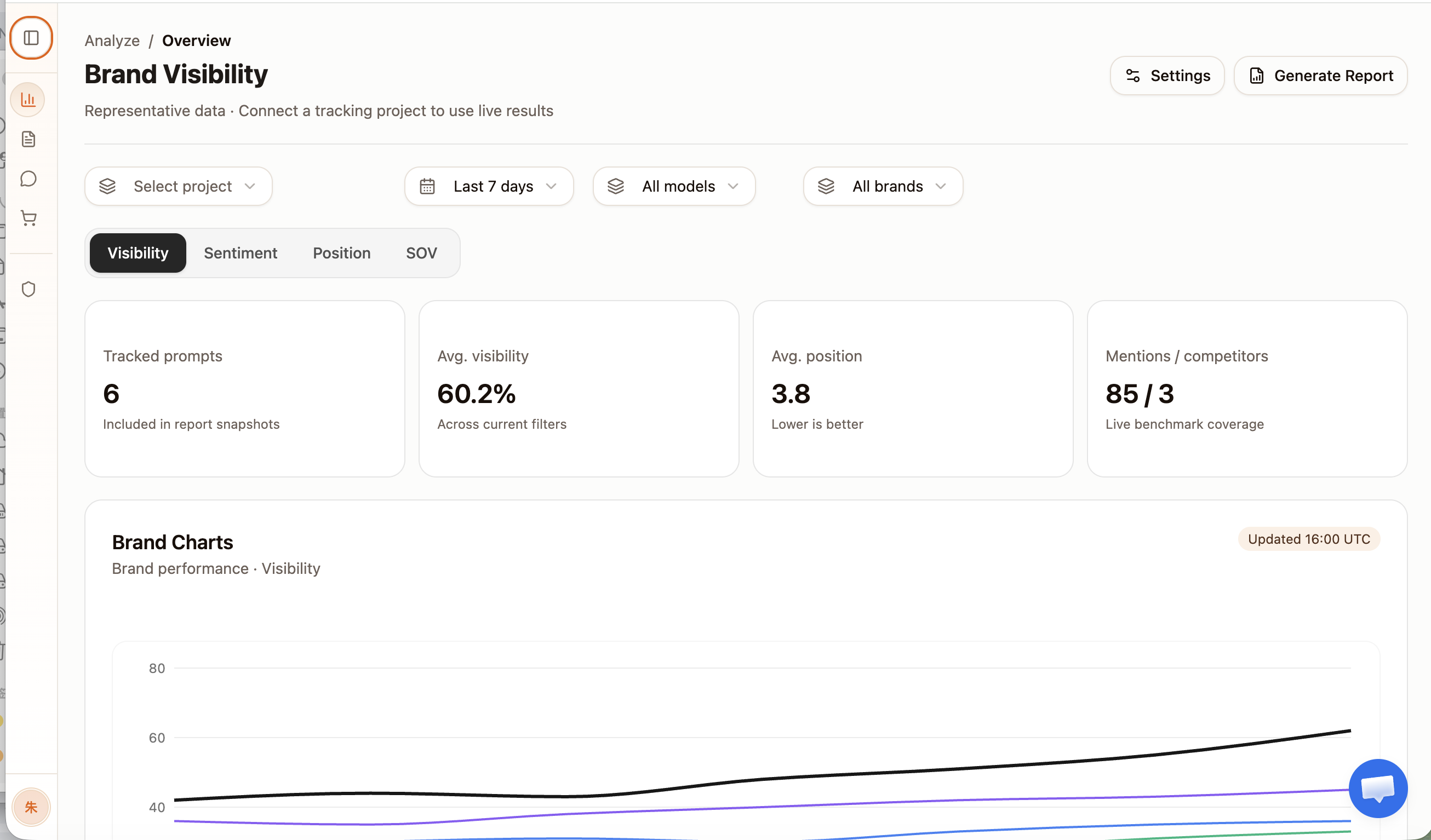
GoGlobal uses the current project, model, brand, metric, and date-range filters to create a self-contained GEO overview. The same reporting frame can then be revisited as the visibility baseline changes.
Saved scope
Preserve the project, date range, model, brand, and metric used for the snapshot.
Shareable output
Create a time-limited public link or download a standalone HTML report.
Report history
Review generated snapshots, statuses, filters, and prior outputs from one queue.
How GoGlobal streamlines GEO reporting
Choose the reporting scope
Set the project, date range, AI model, brand, and primary metric in the live overview.
Generate a self-contained snapshot
Queue the report when the dataset is large, or create the output immediately when processing is complete.
Share or download the result
Create a seven-day share link for review or download a standalone HTML file for an offline record.
Use report history for the next review
Return to earlier snapshots, filters, and action items when measuring what changed in the next cycle.
Keep reporting tied to the same GEO baseline your team uses to make decisions.
Generate Reports From the Live GEO Overview
The report starts from the same filters used during analysis. That preserves the selected project, time window, model, brand, and metric instead of forcing someone to recreate the scope in a slide deck.
Report scope
Generate the snapshot from the same filters used in analysis
Workspace and tracked prompt portfolio
Comparable visibility window
Included AI answer engines
Lead chart and report emphasis
Deliver a Shareable Link or Standalone File
Choose the output that matches the review. A time-limited public link is useful for quick stakeholder access, while a standalone HTML file creates a portable offline snapshot.
Delivery options
Choose the format that matches the stakeholder review
Shareable report URL · Expires after 7 days
Self-contained current overview snapshot
Both outputs preserve the selected report scope and generation time.
Keep Every Reporting Cycle in One History
Generated reports remain attached to the project with their creation time, filters, status, expiry, and underlying data. Teams can retry failed jobs and compare the next review against a known snapshot.
Report history
Status, filters, outputs, and stored snapshots in one queue
Sep 5 · All models · Visibility
Aug 29 · ChatGPT · SOV
Aug 22 · All models · Citations
Reporting That Stays Connected to the Workspace
Move from live analysis to a durable stakeholder snapshot without a manual export-and-rebuild loop.
Filter-aware snapshots
Keep the report tied to the exact analysis scope.
Secure sharing
Create expiring public links for fast stakeholder review.
Portable exports
Download a self-contained HTML record of the overview.
Report history
Return to prior jobs, filters, data, and action items.
Who Uses GoGlobal Automated Reporting
Agencies
Create consistent, client-ready GEO updates across projects.
Marketing leaders
Review a focused visibility snapshot without opening the workspace.
GEO operators
Keep findings and action items attached to the measured baseline.
Cross-functional teams
Share the same evidence with content, brand, PR, and leadership.
Frequently Asked Questions About Automated Reporting
How GoGlobal measures, explains, and operationalizes automated reporting inside its GEO workspace.
Explore GoGlobal GEO Features
Continue from this capability into the related measurement, analysis, and reporting workflows.
Related Product Capabilities
More Product Capabilities
Start With GoGlobal GEO
Put Automated Reporting Into One Measurable GEO Workflow
Start with a brand, market, competitor set, and prompt portfolio. GoGlobal keeps the resulting visibility, citations, sentiment, competitive context, and reports connected.